


Course Communication, Expectations, and Grading
Grading Information
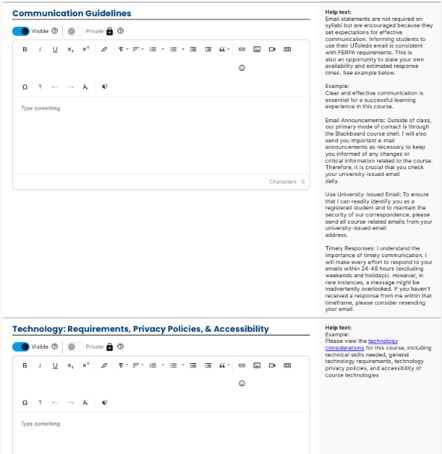
- The Communication Guidelines and Technology sections are optional and private, visible only to enrolled students.
- Use this section to explain how course communication will occur, such as Blackboard announcements and email.
- Instructors may outline expected response times for student messages.
- University‑issued email should be used for official course communication to ensure proper identification and delivery.
- The Technology section may include technology requirements, privacy considerations, and accessibility information related to course tools.
- The Help Text panel provides examples and guidance for what may be included.
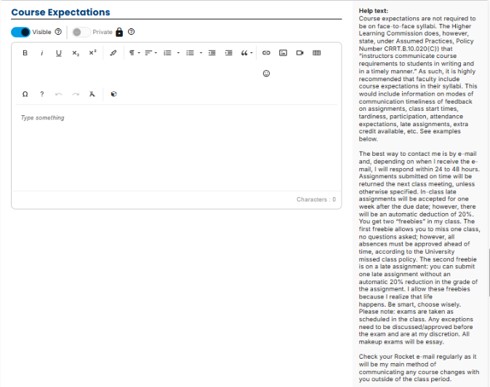 The Course Expectations section is optional and private, visible only to enrolled students.
- This section is used to clearly communicate course requirements and norms to students.
- Content may include expectations related to:
- Attendance and participation
- Timeliness of assignments and late‑work policies
- Feedback timelines
- Exams, assessments, and class activities
- Extra credit or special course policies
- Including course expectations supports clear, consistent communication and helps students understand how to succeed in the course.
- The Help Text panel provides examples of appropriate content that may be included.
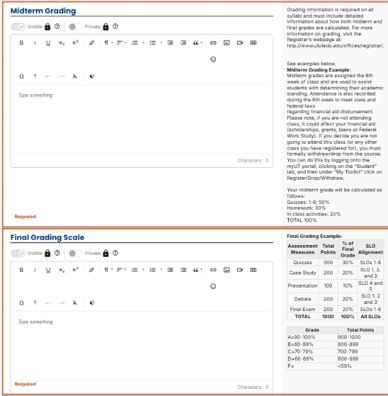
- Midterm Grading is required for applicable courses and must be completed.
- Use the Midterm Grading section to explain how midterm grades are calculated and reported.
- Midterm grading supports state and federal requirements, including financial aid reporting.
- The Final Grading Scale section is required and must be completed.
- Use this section to clearly outline:
- Assessment categories (e.g., exams, quizzes, assignments)
- Point values or percentage weights
- Letter grade ranges
- Tables may be used to present grading breakdowns and final grade scales.
- Clear grading information promotes transparency and helps students understand how grades are determined.
- Examples and formatting guidance are provided in the Help Text panel.