


Setting up Course Schedule in Simple Syllabus
Course Schedule
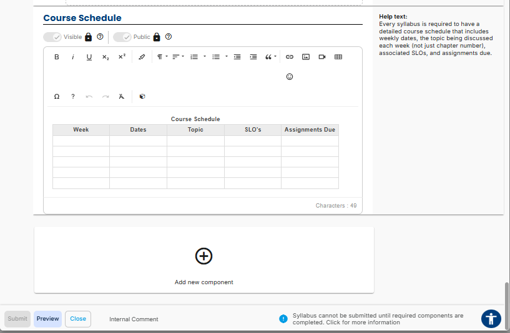 The Course Schedule section is required and must be completed for every syllabus.
- This section is public‑facing and visible to students and the general public.
- Every syllabus must include a detailed weekly course schedule.
- The schedule should include, for each week:
- Week and dates
- Topics being discussed (not just textbook chapter numbers)
- Associated Student Learning Outcomes (SLOs)
- Assignments due dates
Course Schedule Tips
- A table format is recommended to clearly organize schedule information.
- The course schedule does not have to be a table; lists or other structured formats are allowed.
- Tables are recommended for clarity, but instructors may format the schedule in a way that best fits the course.
- If using tables, ensure they are accessible (e.g., include headers and captions).
- If course dates, topics, or assignments change, the Course Schedule should be updated to reflect those changes.
- The Help Text panel provides guidance and examples for required schedule content.
- Additional sections may be added using the “Add new component” option, if needed.
- The Accessibility Checker (blue sign at the bottom right) highlights the edits needed to ensure screen‑reader
accessibility.
- When the Accessibility Checker shows no issues, the content is fully readable by screen readers.
- Changes can be made after submission; edits update the syllabus in real time, replace the previous version, and there is no archived backup currently available, though the syllabus can be downloaded or printed at any time.