


How to manage course information and Student Learning Outcomes
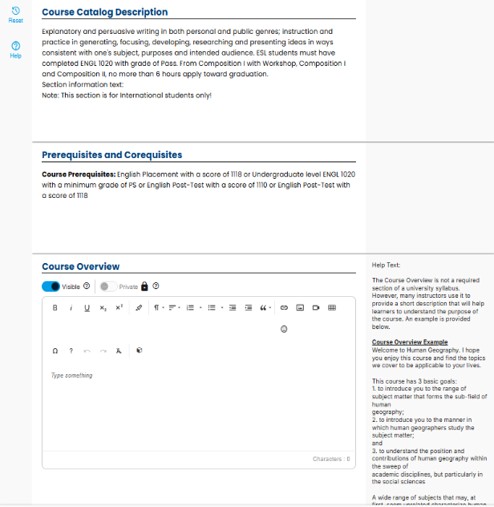 Course Information
- The Course Catalog Description is imported from CIM automatically and does not need to be entered.
- Prerequisites and Corequisites are also populated automatically from Banner.
- The Course Overview is an optional section that you may complete.
- The Help Text on the right side provides an example of content you may include in the Course Overview.
- The Course Overview is Private by default and visible only to students.
- You may choose to change this section to Visible to your students, depending on your preference.
Student Learning Outcomes
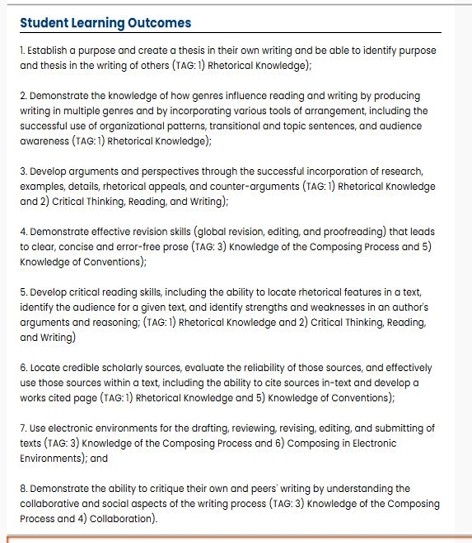 Student Learning Outomes (SLOs) are imported automatically from CIM when available.
- Faculty may submit and publish a Simple Syllabus even if SLOs are not currently loading from CIM.
- Missing SLOs does not prevent submission of the syllabus.
- When SLOs are not visible, instructors should manually enter them in the Course Expectations section (or a similar section) to provide students access to this information for Fall 2026.
- Approved SLOs added to CIM later will automatically load into Simple Syllabus.
- Faculty are encouraged to complete their syllabi without waiting for their SLOs to be approved in CIM.
- Once CIM‑fed SLOs are available, instructors may review and republish the syllabus as needed, without rebuilding it from scratch.
Quick CIM-SLOs Tips
- Complete and publish the syllabus without delay.
- Manually enter SLOs as a temporary measure, if necessary.
- Update the syllabus later once CIM and Simple Syllabus are fully synchronized.
- When SLOs have not been entered into CIM, Simple Syllabus continues to pull from the system as designed, but the SLOs are not yet available in the system.
- For SLOs not yet approved, they will automatically populate in Simple Syllabus once approved in Fall 2026, and any temporary manually entered outcomes can be deleted.
- Complete and submit the syllabus now so it is ready for the first day of Fall 2026;
content may be updated later as needed, and any edits will save over the previous
version.
Core Courses and Teaching Methodology
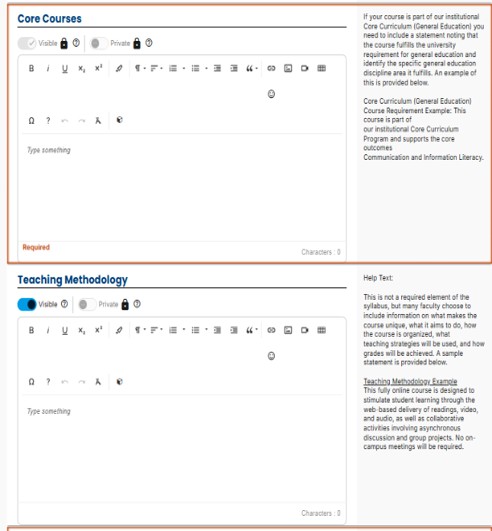 The Core Courses section is required and must be completed.
- This section is Private and visible only to students.
- If a course is part of the Core Curriculum, a statement must be included indicating that the course fulfills a required general education requirement.
- The statement should identify the specific general education discipline area the course fulfills.
- An example is provided in the Help Text area.
- The Teaching Methodology section is optional.
- This section is Private and visible only to students.
- Visibility can be turned on or off at the instructor’s discretion.
Need help? Contact Fatmeh Alalawneh at 419.530.4017 or email SimpleSyllabus@UToledo.Edu